Many streamers around the world know that to grab the best game deals, keeping track of their Steam Wallet balance is crucial. Whether you’re eyeing a new AAA title, exploring indie gems, or eagerly awaiting the next Steam Summer Sale, knowing how much credit you have ensures that you never miss out on top games.
After receiving a Steam gift card or topping up your Steam Wallet, the next step is to check your credit. This guide will walk you through how to check your Steam gift card balance, how your Steam Wallet works, and where to safely purchase original gift cards online.
Understanding Your Steam Wallet
Your Steam Wallet acts like your personal bank account within Steam. It’s where funds from gift cards, PayPal, or other payment methods are deposited. These funds can then be used to buy games, downloadable content (DLC), in-game items, skins, and more.
Your Steam Wallet works as a prepaid account with spendable funds, allowing you to use the balance for any purchase across the Steam store. It’s important to note that Steam Wallet balances are tailored to different regions, and once you add funds, you can’t convert them back into cash. When you top up your wallet, the balance will instantly reflect under your profile and be ready for use across the entire Steam platform.
How to Check Your Steam Gift Card Balance on the Steam Website
To check your Steam gift card balance, you can easily do so via the Steam website:
-
Log into the Steam website using your account.
-
Once logged in, click on the ‘Help Me With My Issue’ button to contact Steam’s customer support if you need help checking your balance.
-
Alternatively, you can look at the top right corner of the page below your profile name to view your current Steam Wallet balance.
-
Another option is to visit any Steam store and ask a cashier to check your card balance.
How to Activate Your Steam Gift Card
Before redeeming your Steam gift card, you must activate it. Here’s how to do it:
-
Open the Steam app on your device.
-
Select the “Games” option from the menu bar.
-
Enter your Steam Wallet code and click on Continue.
-
Enter your address, and the Steam card will be activated.
Note: Digital Steam gift cards don’t require activation. When you receive a digital gift card, the amount is added directly to your Steam Wallet without any additional steps.
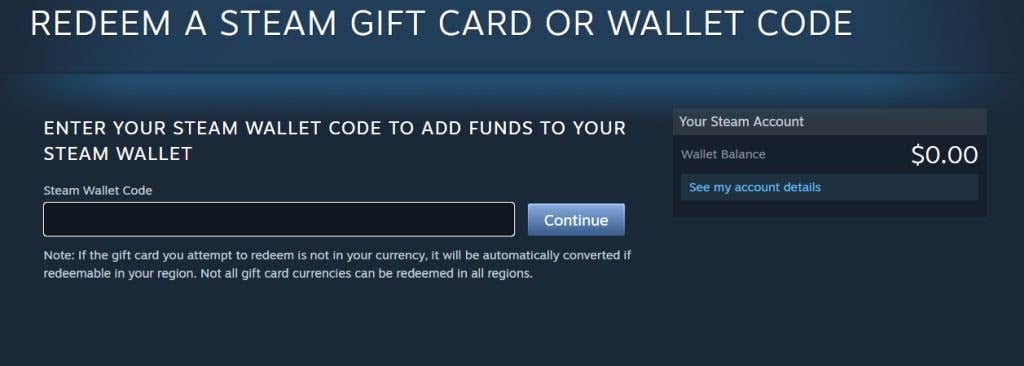
How to Redeem Your Steam Gift Card
To redeem your Steam gift card, follow these steps on either your PC or mobile device:
-
Go to the official Steam website or open the Steam app.
-
Click on your profile name to access your account.
-
Select View My Wallet.
-
Tap on Redeem a Steam Gift Card or Wallet Code.
-
Enter your gift card code in the provided field and click Continue.
After completing these steps, your Steam Wallet will be credited with the value of the gift card, and you can start shopping for games and other content right away.